

Workspace upgrade
For each workspace there is the possibility to choose one of the four available license models select. The current license model sets the current limitations
License models per workspace
For each workspace there is the possibility to choose one of the four available license models select. The current license model sets the current limitations , e.g. how many people can access the workspace and the projects created in it at the same time.
After the initial registration, each user receives a new Workspace with the free Personal Plan.

Limitations of the Personal Workspace
Change license model
To change the license model of the current workspace, please open the workspace settings first.
To do this, select the appropriate workspace in the overview at the top and then click Workspace Settings.
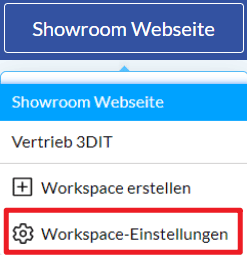
Workspace menu
In the Subscription menu (1) you can change the plan for the current workspace.
The license overview (2) shows all available license models from which you can choose.
A user overview (3) lists all users in the current workspace. Blue users are administrators and have additional rights like duplicating\moving a govie to another workspace.

License models overview
In the license overview, your currently selected workspace is marked with a blue border.
